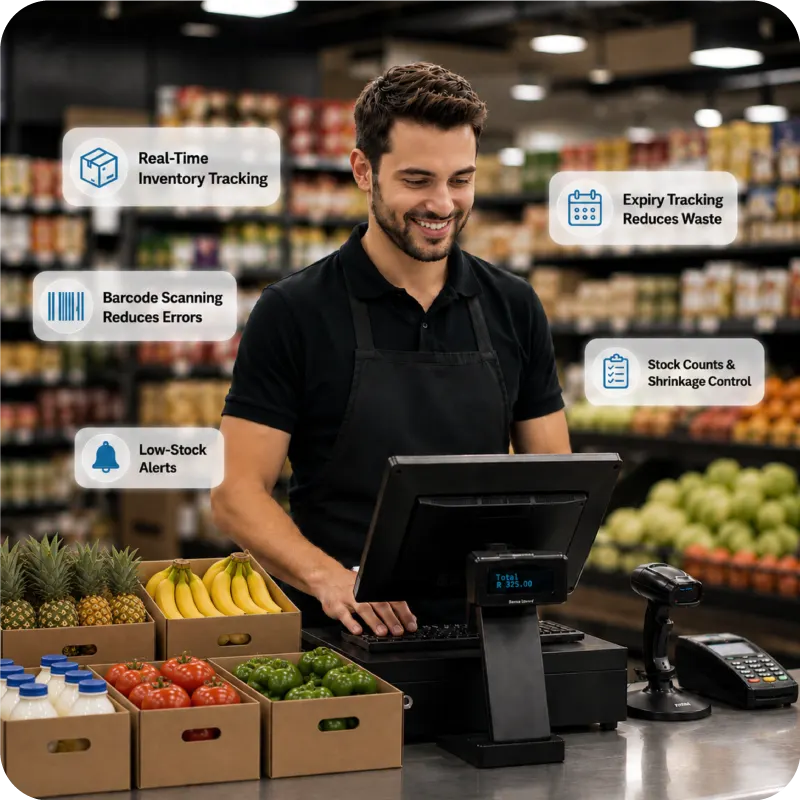
Quick Summary:
Modern supermarkets in South Africa need more than basic billing systems. Customer expectations of queue-less billing coupled with management of thousands of product SKUs require more than traditional Till systems. A modern POS system with features engineered for today’s operations is what supermarkets need.
This blog will help you understand the following:
- What makes a modern supermarket POS system different from a traditional Till system.
- Which 15 essential POS features modern supermarkets should look for.
- Key features such as offline billing, inventory management, and expiry tracking.
- How to evaluate POS software before implementing it across your supermarket.
From managing multiple inventory categories and thousands of product variants to overseeing that all items are properly shelved, supermarket workflows are not easy. Amidst already hectic operational activities, you do not want billing counters to be queued due to an outdated POS that slows billing.
This is why you need the right POS system with all features that help you run your supermarket successfully. You need POS system features that are specifically engineered to ease your supermarket’s daily workflows.
This article details the top 15 features that every modern supermarket POS system should have and how having these features in your Till system will ease your daily supermarket operations.
What Makes a Modern Supermarket POS System Different?
The retail market stayed resilient to the global issues that dominated 2025-26. In fact, as per the Statistics Department of South Africa, retail trade sales expanded by 3.7% in 2025. This is positive news for supermarkets operating in South Africa. Retail is among the very few sectors that offered a glimpse of positivity even in such challenging times.
However, when you are part of such a growing and resilient sector, you cannot ruin your chances just because of the old POS system you are still using. Traditional Till systems deployed in supermarkets were designed only to calculate bills and record sales transactions at the billing counters.
However, contemporary supermarkets have evolved far more than they did in the 90s or early 2000s. The SKUs and product assortments have increased multiple times. Inventory management takes a lot of time. Moreover, customer expectations have changed, and no one wants to wait even for a minute at the billing counters.
When everything has evolved, you cannot be using the same old Till system. Right?
If you are still using outdated POS systems, you risk losing customers and your precious time. Worse, you risk losing the profit potential that a smart POS system offers.
Let’s discuss what POS system features you should look for in a modern POS.
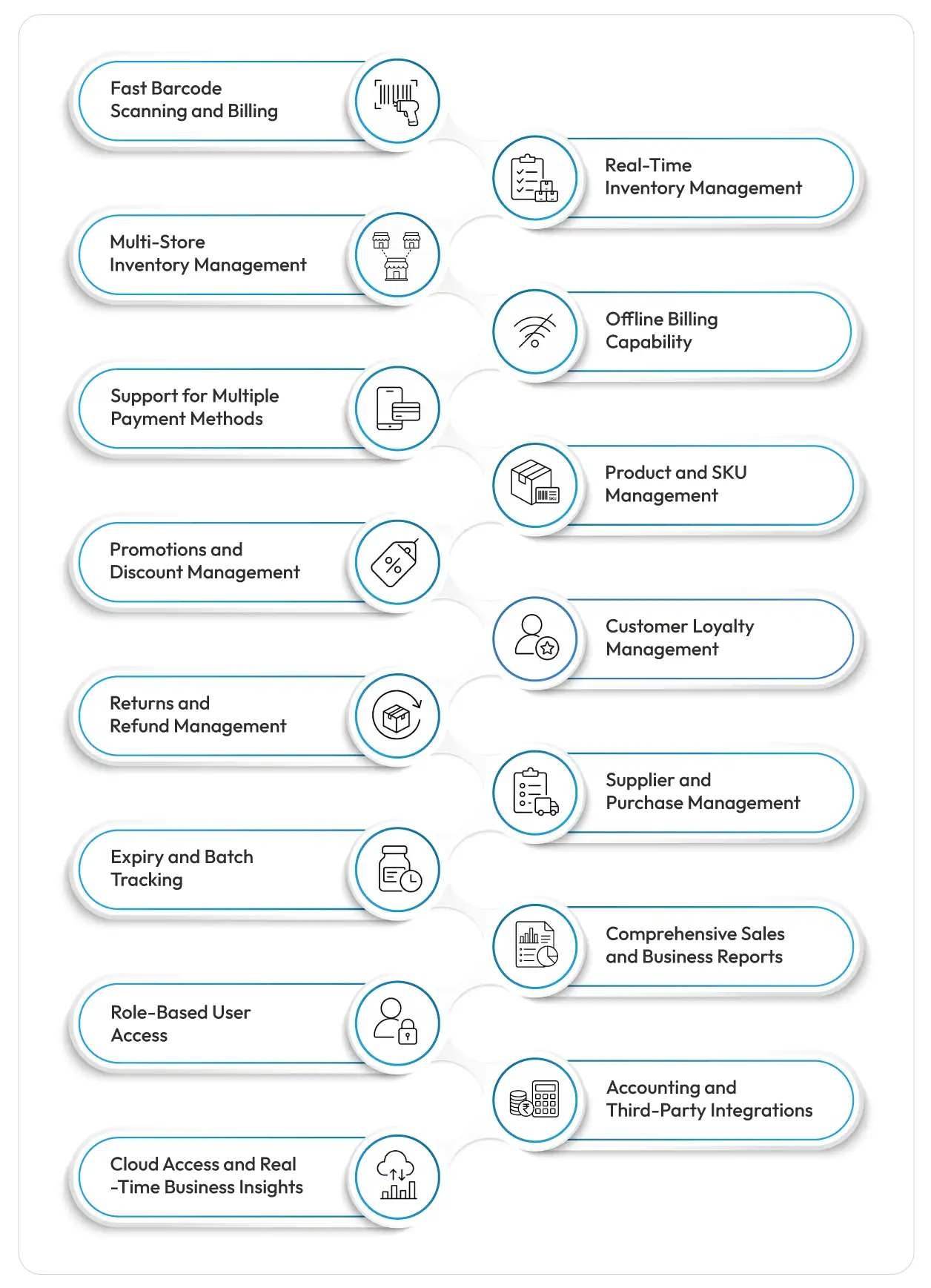
15 Essential Features Every Supermarket POS System Should Have
So, what are the key features required in a Till system for a supermarket?
Here are 15 capabilities worth checking before you choose one.
1. Fast Barcode Scanning and Billing
Customers don’t want to stand in lines at the billing queues, nor do cashiers want to keep manually adding product codes, label data, or prices in the POS system. So, fast barcode-based scanning and billing is the first feature that you should look for in a supermarket POS. One scan and all product details on the screen, including the discount it has currently.
Then, once all products are scanned, in one click the payment screen must display multiple payment options. Such systems improve the billing speed significantly.
Two more billing features worth considering are:
(A) Weight-based Billing
For supermarkets selling vegetables or products that are sold by weight, the POS must support weight-scale integration for automated billing.
(B) Image-based billing
Image-based billing helps cashiers identify similar-looking products more easily as images are displayed on the screen itself. It speeds up the billing process, further reducing billing lines.
(C) Real-Time Inventory Management
Inventory managers at supermarkets must always know the exact number of inventory they have in all product categories, variants, and departments. This is crucial for timely reorders of stocks and preventing stockout issues.
POS billing software must quickly (in real-time) update the overall stock of the product once the bill is generated. This can happen only when the POS is integrated with the inventory module. In case the product is returned by the customer, the system must again update the stock count in inventory records instantly.
What’s more?
The POS system with a smart inventory management module built into it will also display which products sell the most, which are the least-selling stocks and will send alerts for low stocks too.
Such alerts eliminate the need to constantly keep a tab on stock data. Once an item falls below a certain number, your POS system sends the alerts for it. You can reorder before stockouts happen.
2. Multi-Store Inventory Management
Managing one supermarket is already a job. Managing several branches without a centralised system can become a headache. If every branch maintains separate stock records, sales information, and purchasing data, it becomes difficult to get a complete picture of the business.
This is why modern POS systems have modules for supermarket chain management. It displays all your inventory centrally, location-wise, store-wise, or department-wise, both in standalone and consolidated form. This means you can view data from each supermarket individually or analyse consolidated data across all stores.
One more feature is a stock transfer request. If one of your supermarket stores has surplus items of a particular stock, you can add a stock request for transfer of the same to another store where it is less.
This keeps inventory levels adequate at all stores and also prevents unnecessary procurement of stocks that you already have but at a different store.
3. Offline Billing Capability
What happens when the internet goes down? Or when a power outage disrupts your billing operations.
Did you Know? Recently, on 17-19th May 2026, there was a massive internet disruption in South Africa due to DDoS attacks.
Source:Newcastillian
Your customers are still standing in the queue. Your staff is still ready to bill. But the system won’t work without the internet. All your supermarket operations will come to a halt.
No worries! Modern POS systems continue to work without connectivity. You just need to ensure the POS system that you are implementing is a hybrid POS. An offline or hybrid POS system continues to work without internet connectivity and reconciles data when internet is resumed.
4. Support for Multiple Payment Methods
Your Till system must accept multiple payment modes, including cash, card, EFT, and other digital payment methods. Your POS should be able to handle these payment options without making the cashier’s job complicated.
All methods must be visible on screen, and in one click the cashier should be able to choose the method the customer is asking for. Always check this feature before you deploy the POS system.
5. Product and SKU Management
A supermarket can have thousands of SKUs. The same type of product is stocked in different brands, variants, sizes, flavours, packages, and quantities. Your POS should manage and record them easily. The system should also be able to identify the best- and least-selling SKUs.
Look for capabilities such as:
- Product categories and variants management
- SKU management
- UOM (different selling units)
- Weight-based products
- Product images
- Product-wise supplier information
- Pricing information
Did you Know? Before buying a POS system for a supermarket, use your own products to be added in the demo. Test weighted items, different UOMs, variants, discounts, and barcoded and non-barcoded products to see whether the POS can handle your real supermarket workflows.
6. Promotions and Discount Management
Supermarkets are always running some kind of offer. Festive offers, promotional sales by brands, weekend/weekday specials, buy-one-get-one offers, loyalty discounts, clearance pricing, seasonal promotions, etc. You cannot manually keep editing the prices of products in your POS for every offer you launch.
This is why percentage-based or flat-rate discounting is an essential feature.
You can bulk apply this to selected product categories or products on which you want to offer discounts. The POS will apply that percentage or flat discount amount automatically during billing.
7. Customer Loyalty Management
Customer loyalty is key to success in retail businesses. Leading South African supermarket chains such as Shoprite, Pick n Pay, Massmart, Woolworths and SPAR use loyalty programmes to encourage repeat purchases and strengthen customer relationships. For instance, Shoprite runs this smart loyalty reward system, the Price Plus Club.
Similarly, your supermarket store must also deploy a POS that can award loyalty points/reward points with every bill (as per its value). Customers must be able to redeem these points for cash or discounts in subsequent purchases from your supermarket.
So, loyalty and digital membership card management is a smart POS feature you should not compromise on when selecting a POS software.
8. Returns and Refund Management
Returns are inevitable in the supermarket business. You will also have to issue refunds sometimes when the customer is not willing to take a replacement or if the replacement is not possible. In such cases, your POS should have a separate module for returns and refund management with automatic adjustments in inventory after each return/refund.
9. Supplier and Purchase Management
What if you can get a POS that also handles your supplier relationships and helps in purchasing inventory with features for:
- Supplier/Vendor Management
- Supply recording and tracking
- Purchase Order
- Material Inward
- Purchase Invoices
- Purchase Return (Debit Note)
- Supplier-wise Product Mapping
- Purchase Conversions (Unit Conversion)
- Supplier payments
- Automated Procurement
With these features, you can save money by mapping products to their best supplier in terms of affordability, quality, and delivery times.
Features like automated procurement or automated supply orders send stock purchase requests to authorised suppliers directly when a stock falls below a predefined threshold level.
11. Expiry and Batch Tracking
Supermarkets sell FMCG goods that have a ‘best use before date’ and also fresh foods, milk, dairy products, meat, packaged foods, beverages, and more that have a fixed ‘expiry date ‘. If you want to run your supermarket profitably where products don’t get spoilt because they weren’t sold long before the expiry date, then you need to look for this POS system feature.
The expiry management module tracks the expiry date of each product and sends alerts well before the product is going to expire.
You can bundle such products for offers/promotions or change their position on shelves to ensure they sell before the expiry date. Expiry and batch tracking helps supermarkets reduce product wastage and losses due to expiry issues.
12. Comprehensive Sales and Business Reports
Knowing your business and its potential or risks is key to improving it further. A POS system that offers detailed reports related to daily sales, best-selling products, slow-moving items, payment dues, receivables, supplier reports, location-wise performance, etc. can help to improve profitability.
For example, if a product is not selling, you can reduce its stocking. Customer reports that tell you that a particular customer who used to buy regularly hasn’t bought anything for the last 30, 60, or 90 days can help in reconnecting with them with new offers. The customer contact module in advanced POS systems such as Vasy helps in this.
13. Role-Based User Access
POS is your supermarket’s operational engine. It cannot be trusted with every employee or an untrained employee. Therefore, modern POS systems come with this feature–Role-Based User Access. You can allow access to trained cashiers, inventory managers, the marketing team, or other trusted employees only.
Also, you can further make it role-based access. For instance, a cashier may not need access to the inventory or procurement module. So, you restrict it individually. The owners may keep full access to themselves.
This can help reduce problems related to unauthorised discounts, refunds, price changes, and other staff-led fraudulent activities.
14. Accounting and Third-Party Integrations
Modern POS systems are built for financial reporting and compliance too. The system has an inbuilt accounting module that does financial reporting for VAT compliance. All accounting is completed within the system itself. It eases your accounting team’s workflows and saves time.
Third-party payment integrations, such as e-commerce, payment, and accounting integrations, are some of the key integrations you should look for in the POS software. These integrations increase the functionality of the system.
For example, e-commerce integrations (like Shopify, WooCommerce) help you sell online, payment integrations are required for taking online payments from shoppers, and accounting integrations ease financial reporting.
15. Cloud Access and Real-Time Business Insights
A supermarket owner with one or more stores cannot always be available at all stores. So, cloud access of the POS system ensures that the owner or the key personnel can log into the system from anywhere using a desktop, laptop, or mobile device. Access just needs the user ID and password.
Cloud access allows authorised users to view all of the supermarket POS’s modules and data remotely. You can check sales, inventory, reports, and branch performance in real-time without physically travelling to every store.
How to Evaluate these POS Features Before Buying?
Certain POS providers may market their products as having every feature a Till system needs. However, you need to evaluate certain aspects of these features required in a Till system before selecting for supermarket-wide implementation.
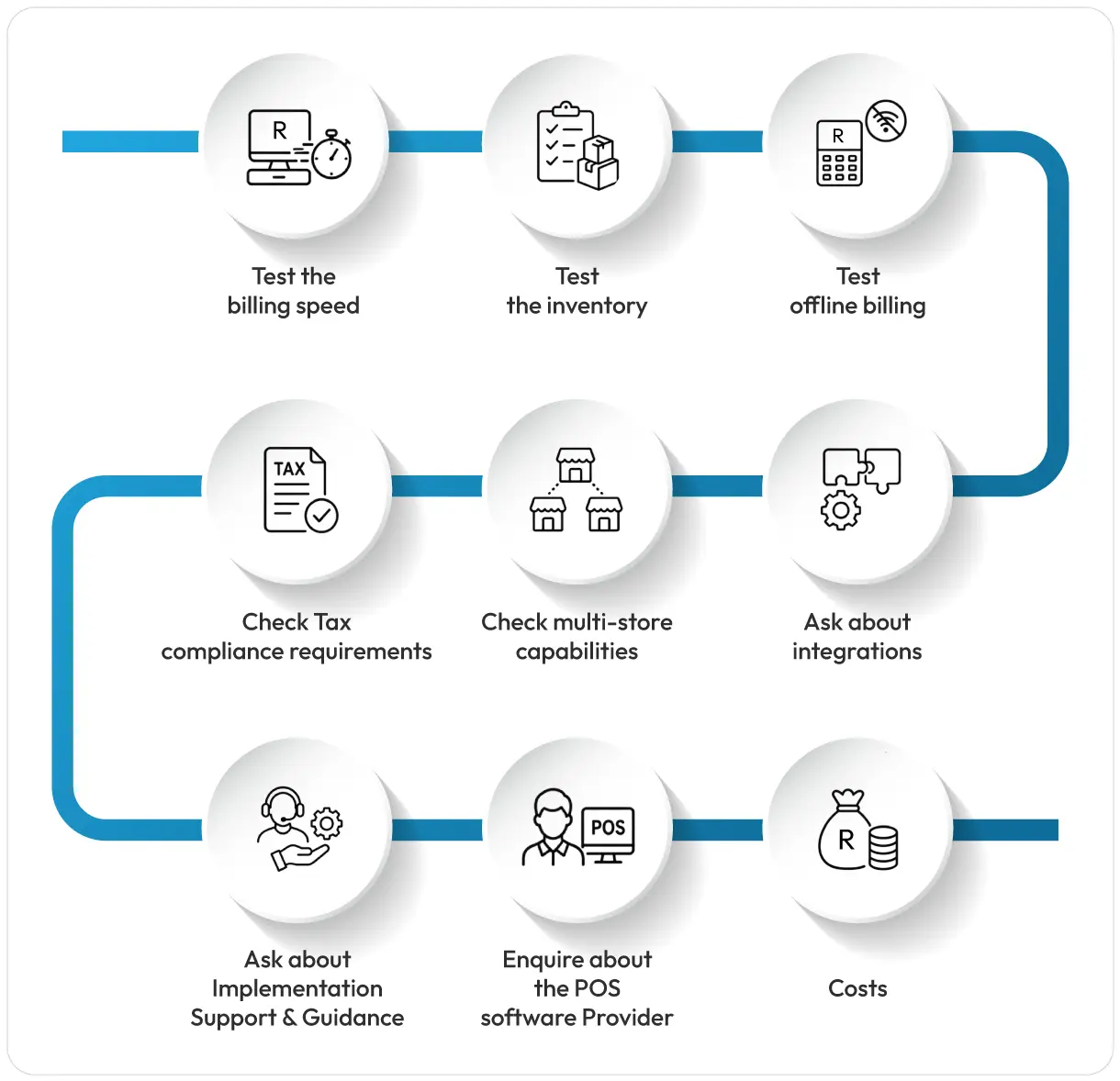
Before buying, check the following:
1. Test the billing speed: Ask the provider to show you in a live demo how fast the billing actually happens. You can check the multi-product billing transaction.
2. Test the inventory: Also check the inventory module and see how products are listed inside it, what happens when a product is sold, returned, or transferred.
3. Test offline billing: Check how the POS software performs offline and what happens when connectivity resumes. Whether it actually reconciles the data or not. Check if any data is lost during such reconciliation.
4. Check Tax compliance requirements: Make sure the system can support the SARS tax system, compliance needs, and accounting processes.
5. Check multi-store capabilities: If you plan to expand your current stores, check the pricing for the same. Also check if the POS scales without hassle. You can check if it is easy to add new stores, customers, and suppliers or whether adding another store makes it complicated.
6. Ask about integrations: Check whether the POS offers flawless (without extra charges) integrations with the accounting software, payment systems, e-commerce platforms, and other third-party tools.
7. Ask about Implementation Support & Guidance: You should be clear enough to ask about what support for implementation, employee training, and technical aspects the POS software provider offers.
8. Enquire about the POS software Provider: Check their current clients, experience, retail industry software experience, Google reviews, awards, recognitions, etc. to understand their reliability.
How Vasy is Built for Modern Supermarket Operations?
Vasy’s POS software for supermarkets is engineered intuitively to solve all limitations of a traditional Till system. It offers all features required in a Till system mentioned above in the article and excels on all parameters that POS evaluation requires.
Its supermarket POS brings billing, inventory, payments, reporting, customer management, and other operational functions into one ecosystem.
It’s built for South African supermarkets, with particular strength in offline capabilities, flawless VAT billing, SARS compliance, and seamless payment support for South African payment systems.
Its advanced features include weigh-scale integration and image-based billing, and multi-UOM management and 150+ MIS reports are unbeatable USPs. Ultimately, the right POS system features should make your supermarket easier to run, not add another layer of work.
Book a free demo of Vasy Supermarket POS Software and explore the features for yourself.
Frequently Asked Questions Regarding Modern Supermarket Features
The most important features of a smart till system include barcode billing, inventory management, CRM, accounting, payment integrations, offline load-shedding support, discount management, and refund processing. For supermarkets, expiry tracking, supplier management, and warehouse management are also important.
Yes. Modern supermarket POS software can update inventory automatically when products are sold, returned, received, or transferred. POS inventory modules can also categorise and track stock at the SKU and product-variant level.
Yes, if the POS has an offline or hybrid mode. The system can continue processing supported transactions while connectivity is unavailable and synchronise data once the connection returns.
Yes. Advanced POS systems such as Vasy come with multi-store management features, including inventory transfers between stores and centralised inventory management, helping supermarket chains manage multiple locations from one system.
Yes. POS systems with expiry and batch management can record expiry dates and help businesses identify products approaching expiry. This gives supermarket teams time to sell, promote, rotate, or remove products before they become waste.
Last Updated on August 25, 2026