Quick Summary:
Manual billing creates problems for South African retailers as it slows down the billing counter, can cause input errors in billing, and leads to poor checkout experiences. Barcode scanning lets cashiers bill faster as they don’t have to manually enter product info (product name, category, code, VAT, price, and more) in the till system. This post explains why manual entry is slow and how barcode scanning expedites retail billing.
This article will help you understand:
- Why the manual billing method slows down the counters.
- How barcode scanning can speed up the retail billing process.
- A comparison of barcoding vs. manual entry methods.
- A simple, step-by-step guide to implementing barcode billing in South African retail stores.
Retailing in South Africa is getting busier every second. Shoppers don’t like to wait in billing queues. If they see cashiers billing manually and entering all product data by typing it in on the dashboard, they would simply get annoyed. Also, manual billing can lead to errors in prices, wrong discount input, or entering incorrect product variant info, causing losses to retailers.
In modern retail environments, you can’t be using outdated manual billing processes. This is why you need barcode scanning systems to speed up billing processes. A reliable barcode scanner is key to keeping your billing counters moving smoothly.
This article details how barcode scanning speeds up the billing process in South African retail stores, supermarket chains, hypermarkets, convenience stores, Spaza shops, bakeries, and more.
Why Traditional Manual Billing Takes Longer
Traditional billing means you are still using spreadsheets or till systems that require manual entries. It takes longer to bill via this method, as price, discount, product name, type, category, etc. will have to be entered manually by the cashier.
Moreover, if the POS doesn’t even have a barcode scanning method, it is very unlikely to have payment integrations for faster checkouts.
The result? Billing lines moving slowly, shoppers getting annoyed, and retail stores unable to provide premium shopping experiences.
Did you Know Manual data input has an average error rate of about 1 to 4%, while a barcode scanner can make a mistake once in several million.
Source:Lido
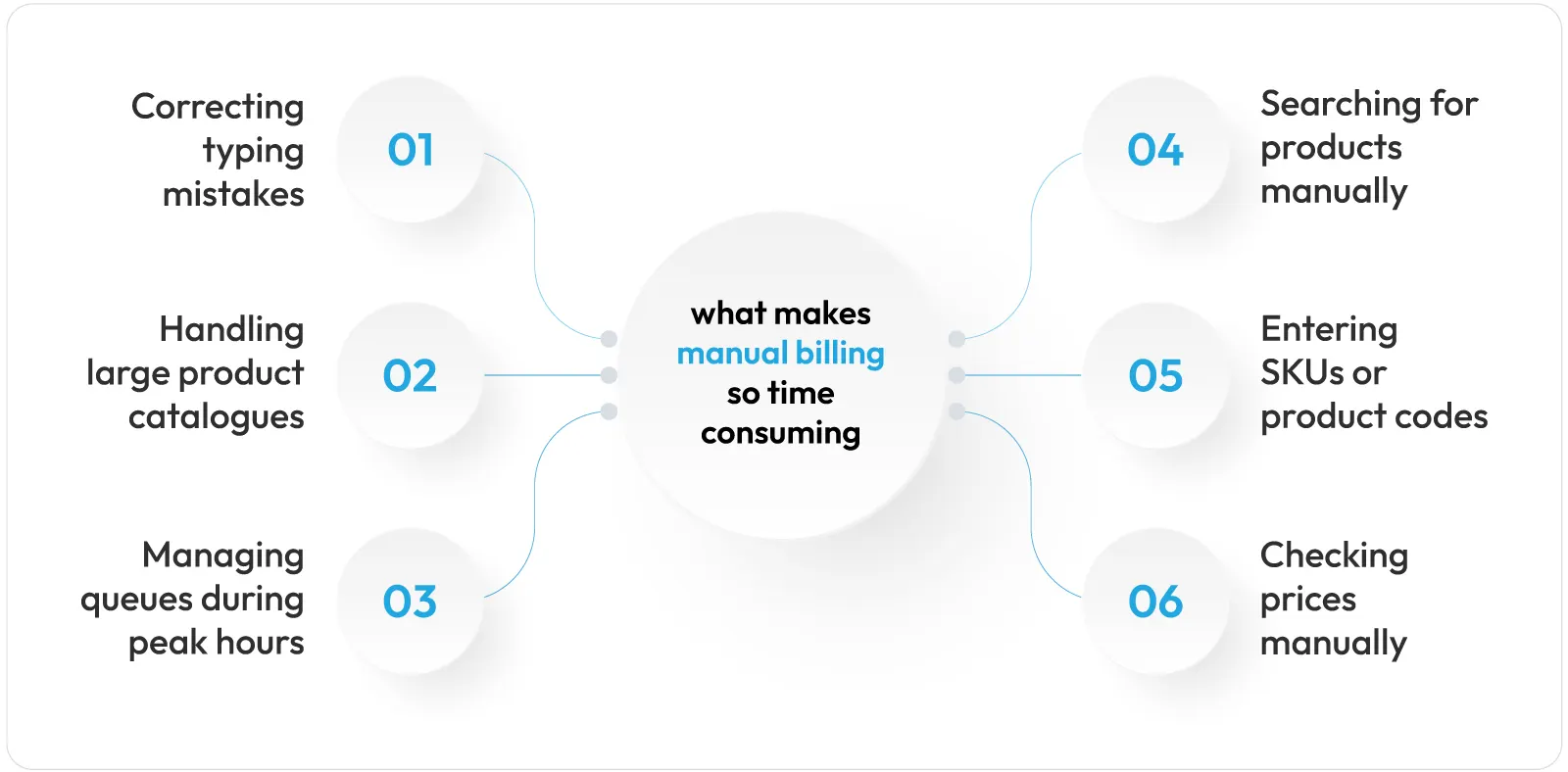
Let’s discuss in detail what makes manual billing so time-consuming:
1. Searching for products manually
As there is no scanner available, cashiers need to search for the item in either a printed list or a catalogue, which makes every sale take longer.
2. Entering SKUs or product codes
Entering a product code manually is hard and easily subject to mistakes, particularly with busy checkouts and customers waiting in line.
3. Checking prices manually
The cashier will have to check the prices on the label. Finding the price among so many details on the label itself is a challenge. Cashiers cannot memorise prices of all items.
Moreover, price updates happen frequently due to discounts and restocking activities, so a cashier trying to memorise prices also won’t be able to keep up with such dynamics.
4. Correcting typing mistakes
Each typo results in halting the sale, time wasted in detecting the error, and entering the details again, which is stressful for both the cashier and the customer in line.
5. Handling large product catalogues
Stores with hundreds of SKUs, such as supermarkets, bakeries, or stationery stores, cannot depend on cashiers being able to recall codes and prices accurately. Even manually searching for the product variant in the database will consume extra time.
6. Managing queues during peak hours
The manual entry of product information creates more delays on busy weekends, at month-end sales, festive seasons, and during public holidays.
How Barcode Scanning Speeds Up Retail Billing
Retail technology is moving on an upward trajectory every year. Modern supermarkets, hypermarkets, malls, and retail chains are all implementing AI-powered POS systems that not only improve shopping experiences but also help them save time, operational costs, and resources.
One such retail solution is the barcode-based POS.
It is a complete solution that comes with tools to generate barcode labels, a barcode scanner, and barcode-based billing.
How does it work?
It works by putting all product information into barcode labels, which are then read at the billing counter with compatible barcode scanners. The barcode scanner reads a pre-coded, standardised number from the barcode label on the product.
With one scan, all product data, including product name, price, product code, sales tax rate on that particular product, etc., is directly added to the billing description on the POS, without any typing requirement.
The billing speed now only depends on how fast the cashier takes a product in hand and scans it with the barcode scanner. No delays due to slow typing.
What does the barcode label contain?
The barcode label contains all the information available for the product (which was input earlier during the labelling process). Modern barcodes contain extensive product information. Apart from the product codes, names, variants, prices, and categories, they also contain information related to allergens, expiries, brand ethics and sustainability efforts, product sourcing info, ingredients, and more
How does it improve billing speed?
Barcode scanning speeds up retail billing in South Africa by eliminating slow manual billing workflows and replacing them with faster automated ones.
Cashiers take less time per transaction, there are no long queues, and the chance of errors in price is reduced substantially. This is the main reason why modern retailers in South Africa prioritise barcode scanning over manual billing.
Barcode billing also reduces compliance risks by blocking the sale of expired items. Also, during inventory management, barcoding helps reduce food waste by providing expiry alerts for near-expiry items.
Barcode Scanning vs Manual Product Entry
| Factor | Barcode Scanning | Manual Product Entry |
|---|---|---|
|
Speed per item |
Under 1 second |
Several seconds per item |
|
Accuracy |
Near error‑free: roughly 1 error per 3 million scans. |
Around 1 error per 300 typed characters. |
|
Price consistency |
Prices shown directly after the scan |
The cashier sees the price list in the system, types the product name, and manually finds the price mentioned for the product. |
|
Staff training time |
Short – point and scan |
Longer – memorising codes and prices. |
|
Queue impact during peak hours |
Minimal |
Noticeable slowdown |
|
VAT invoice accuracy |
Consistent, system‑generated |
Prone to typing and calculation errors. |
|
Handling weighed or loose items |
Scale-linked barcode calculates the price by weight in seconds. |
The cashier weighs the item, then keys in the price manually. |
|
Multi-branch price and VAT consistency |
Every centralised POS system extracts the same GTIN-linked price and VAT rate compliance across all stores. Keep prices consistent at all stores. |
Keeping prices the same across all stores will require manual reconciliation of price lists on the till system for all branches. |
|
Stock and inventory accuracy |
Stock is deducted automatically at SKU level with every scan. |
Stock counts with manual billing have to be updated manually. |
|
Shrinkage and loss traceability |
Every sale leaves a scan record, making mismatches easy to trace back to the source. Also, every sale records the cashier’s name. |
Harder to trace errors or price issues back to a specific sale. Multiple cashiers make it more difficult to trace. |
|
Customer experience |
Fast checkouts improve the shopping experience. |
Delays and price disputes at the till hurt the shopping experience. |
|
Staff efficiency at peak times |
One cashier can process more customers per hour. Reduces staff hour costs. |
More cashiers or counters are needed to handle the same footfall. |
How to Set Up Barcode Billing in a South African Retail Store
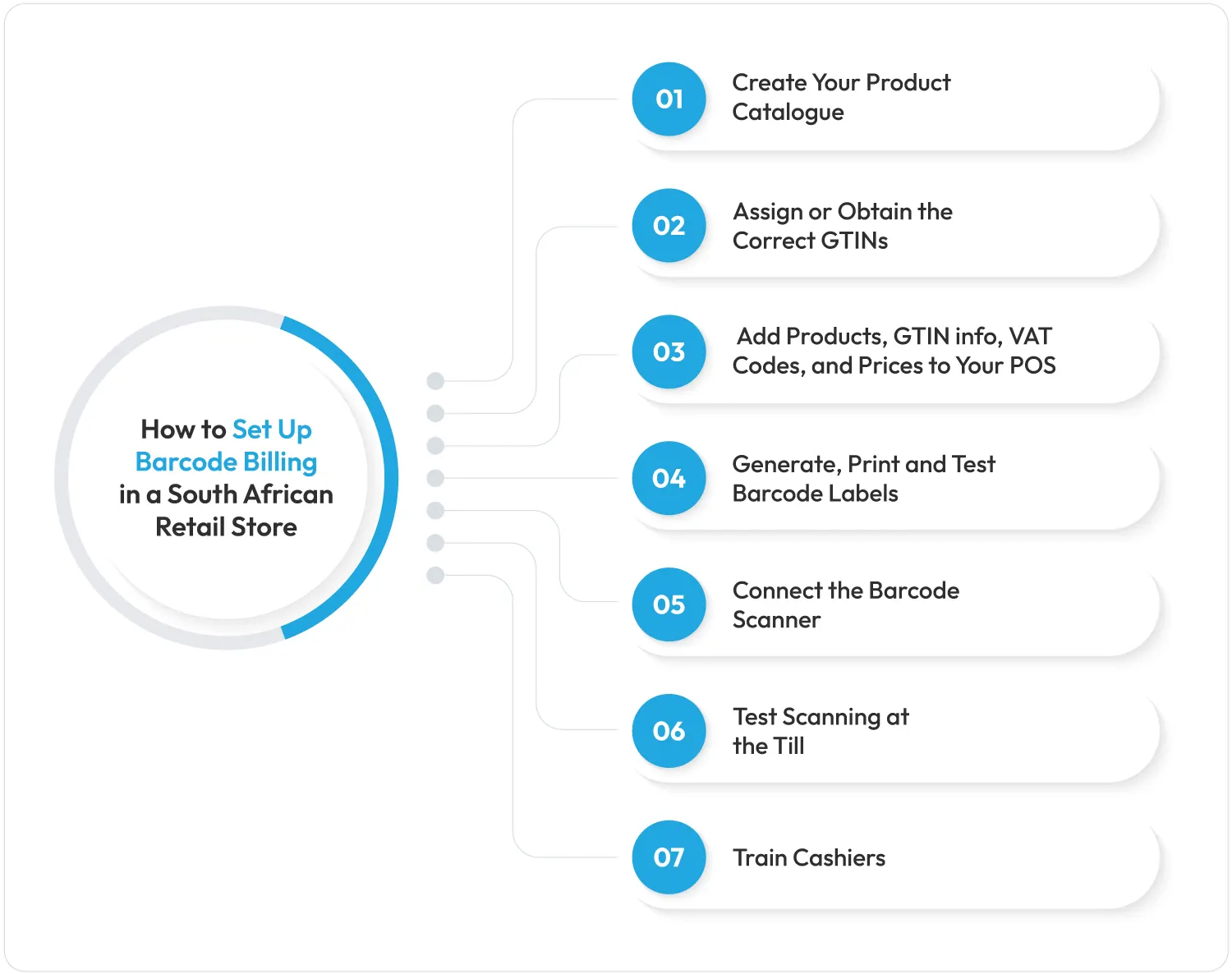
Follow these steps to move your store from manual entry to barcode-first billing:
Step 1: Create Your Product Catalogue
Make a detailed list of your products. Add product name, type of merchandise, product allergen info, ingredient info, category, variant code, expiry date, and price. Group items by category and unit of measure (each, kg, or litre) so that weighed goods and packaged goods are both billed correctly.
Step 2: Assign or Obtain the Correct GTINs
In the second step, you need to get a GS1 barcode from GS1 South Africa. The organisation provides unique code numbers to every product. With GS1 authentication, you can generate a unique 13-digit GTIN for every product, variant, and pack size.
Note:
- South African retail barcodes follow the EAN-13 standard.
- GS1 South Africa charges a membership fee plus an annual renewal fee.
- The fee is based on how many barcodes your store needs.
- You need an official GS1-issued barcode number (GTIN), not a self-made one, if you’re supplying goods to other registered retailers.
Step 3: Add Products, GTIN info, VAT Codes, and Prices to Your POS
Import your product list and GTIN numbers into your POS system to ensure that all information regarding products that was catalogued in Step 1 will be available as soon as item labels are scanned. Advanced POS systems such as Vasy accept a bulk CSV or Excel upload, so hundreds of SKUs can be loaded in one go instead of being typed in one by one.
Set the correct VAT rate (or zero-rated where applicable) against each product. Misclassifying a product’s VAT category is one of the most common SARS compliance errors.
Step 4: Generate, Print and Test Barcode Labels
For internal store purposes, you can generate barcodes from the POS software itself. Advanced POS software has a built-in barcode generator. Create labels and print them on quality paper for better visibility and error-free readability. Test a small batch before running the full print job.
Step 5: Connect the Barcode Scanner
Make sure that the barcode scanner is connected to the POS system properly, and that it can read both shelf labels and codes displayed on the screen in case of online payments. Keep at least one spare handheld or mobile scanner to handle situations when barcode scanners malfunction. Barcode hardware is a key POS implementation checklist for supermarkets in SA.
Step 6: Test Scanning at the Till
Make some test scans using different product categories, such as weighed goods, before implementing the system at the actual billing counter. Confirm that the barcode label is reading properly, it is fetching the right information, and scans without glitches. Also check whether, after every scan and sale, the stock numbers get updated automatically or not.
Step 7: Train Cashiers
Educate staff on what to do in problematic situations, e.g., when a barcode is damaged or the product has no tag at all. Train cashiers through various scenarios such as:
- Barcode device malfunction
- Barcode label torn
- Barcode readability is not clear
- Barcode scans but info doesn’t get displayed on POS
- Load-shedding during barcode scans
Common Barcode Billing Problems Retailers Should Avoid
Even deploying a barcode system (labels, scanners, barcode software) isn’t enough. You need to adhere to some best practices and take proactive measures to keep your barcode-based billing flawless.
Below are the common mistakes that you should avoid to keep barcode billing error-free:
1. Not registering with GS1
Not registering with GS1 and instead using unofficial or duplicated barcodes can be risky.
- Unofficial or duplicate barcodes cause billing mismatches.
- Skipping GS1 registration leads to scanning errors.
- Unregistered barcodes confuse POS systems at checkout.
2. Poor label printing
Poor label printing to save on paper costs may result in unsuccessful scans and readability issues, causing delays at the checkout counter.
- Low-quality labels often fail to scan at checkout.
- Faded or smudged barcodes slow down billing.
- Poor print quality increases scan failures at the counter.
3. Failing to update prices after promotions
Barcode labels contain the information fed to the POS too. So, if you want to change any info at the POS, the same must be reflected on the product labels. Generate new labels and stick them on the products.
- Outdated POS prices create shelf-to-scan mismatches.
- Unupdated promo prices confuse customers at billing.
- Price sync delays lead to checkout discrepancies.
4. Depending on a single scanner
Always keep additional barcode scanners or use a POS system that has support for mobile-based barcode scanning.
- One scanner per store is not enough.
- A single device failure will stop the checkout process.
- Go for mobile-based barcode scanning.
5. No cashier training for scan failures
Not training cashiers on the procedure in case the barcode does not scan causes billing line chaos.
- Untrained staff may not know what to do.
- Lack of backup training delays checkout during scan errors.
- Billing queues chaos
Wrapping Up
The question of how barcode scanning speeds up retail billing in South Africa comes down to a simple conclusion: it reduces the unnecessary manual work during the billing process. The counters that continue to rely on manual entry will not be able to provide modern shopping experiences and may also have to bear losses arising from erroneous billing.
GS1 barcode systems combined with barcode billing software help retailers modernise their billing processes. The benefits range from shorter queues and accurate pricing to full VAT compliance with the South African Revenue Service (SARS).
Whether it is one store or a chain, retailers can turn to Vasy’s business management platform and figure out how barcode-first billing can fit into different store operations. Vasy’s ecosystem comprises barcode-based POS software with integrated modules for handling other operations such as inventory, accounting, CRM, and more.
FAQs About Barcode Billing in South Africa
Yes. Barcode scanning expedites the retrieval of a product's information, including pricing, within seconds compared to several seconds of searching and entering data for each product manually.
Most retailers and online markets demand either the GS1 or GTIN barcode on packaged goods since it is the accepted standard for product identification in South Africa. It is required to deal with registered wholesalers and retailers.
Yes. On average, the error rate for manual inputs falls within 1% to 4%, whereas that of barcode scanning is much lower. This makes barcode scanning a preferred mode for error-free billing. In fact, it is one of the most important features every supermarket POS must have.
Yes. Small retail shops can register a small number of GTINs with GS1 South Africa and connect an affordable barcode scanner to their POS system. Doing so means they can enjoy similar accuracy as big retail chains. Also, if they don’t deal with other registered retailers and need barcodes only for their internal billing and inventory management needs, then they can do without GS1.
Last Updated on September 15, 2026