Quick Summary:
Barcode systems speed up billing, reduce billing counter queues, and provide a smart way to categorise product variants. Advanced barcode systems directly update the inventory with every scan at the POS. A barcode-based POS is a must-have retail business management tool for South African retailers.
This article will help you understand:
- What a barcode system is and why South African retailers need one.
- The tools, software & devices required for setup.
- A step-by-step guide to setting up a barcode system.
- How to choose the right barcode software and type for your store.
Barcode labels on products are necessary to categorise product variants and display price information. Without barcodes, billing counter cashiers are required to manually check the labels and enter all the product information into the POS billing dashboard. Such manual processes will cause unnecessary queues at the billing counters and result in poor checkout experiences.
This is where barcode software makes the difference. It helps implement the barcode system in retail stores along with the advanced POS software. POS systems with barcode-based billing are key to keeping your billing counters running smoothly.
This post explains what a barcode system is, how it works, its significance for retailers, and how retailers can set up a proper barcode system for their retail stores.
What is a Barcode System?
A barcode system is a combination of product codes, barcode labels, barcode scanners, and POS software. POS software interprets these codes for quick product identification in billing, during stock audits in retail stores, or in warehouses.
Immediately after the cashier scans the code, they receive all the required data on the item – its price, description, and quantity in stock.
A complete barcode system consists of three integrated aspects:
- Barcode: A printed or digital code that represents the product data or GTIN of the product.
- Barcode scanner: A portable scanner, a stationary scanner, or a camera-based scanner used for reading the code.
- Barcode Software: Either a POS system or an inventory management system.
Note: For GTIN-compliant barcode generation, you need to get the proper codes for each product. The value of the barcode relates to the product information stored in the barcode and complies with the Global Trade Item Number, or GTIN, which relates to the product or its version.
Why Should Retail Stores Use a Barcode System?
Retail sales in South Africa increased by 1.6% year-on-year as of June 2026. While the sales figures are increasing, it doesn’t mean the margins are increasing too. So, retailers cannot lose money due to billing mistakes. Without a barcoding system, cashiers can make billing mistakes that will further lower the margins.
Also, without barcode implementation, cashiers can make mistakes while manually adding prices, product information, and discount percentages on individual products. This obviously slows down the billing process and results in unwanted queues in front of the cashier’s billing counter. Such issues can be avoided when you set up a barcode system for small- and medium-sized retailers that expedites the billing process.
Moreover, without barcodes, it is difficult to conduct regular stock verifications, stock counting, and audits. Issues such as stock thefts, stock spoilage will be detected late if retailers do not conduct regular stock audits.
Therefore, the implementation of the barcode system is considered one of the best solutions to minimize both human-based billing errors and missing stock scenarios.
Did you Know? Consumer scanning has been around since the first item ever scanned with a barcode at an Ohio supermarket in 1974. Wrigley’s chewing gum was the first item to receive the rapid checkout experience facilitated by the barcode scanning method.
Source:History.com
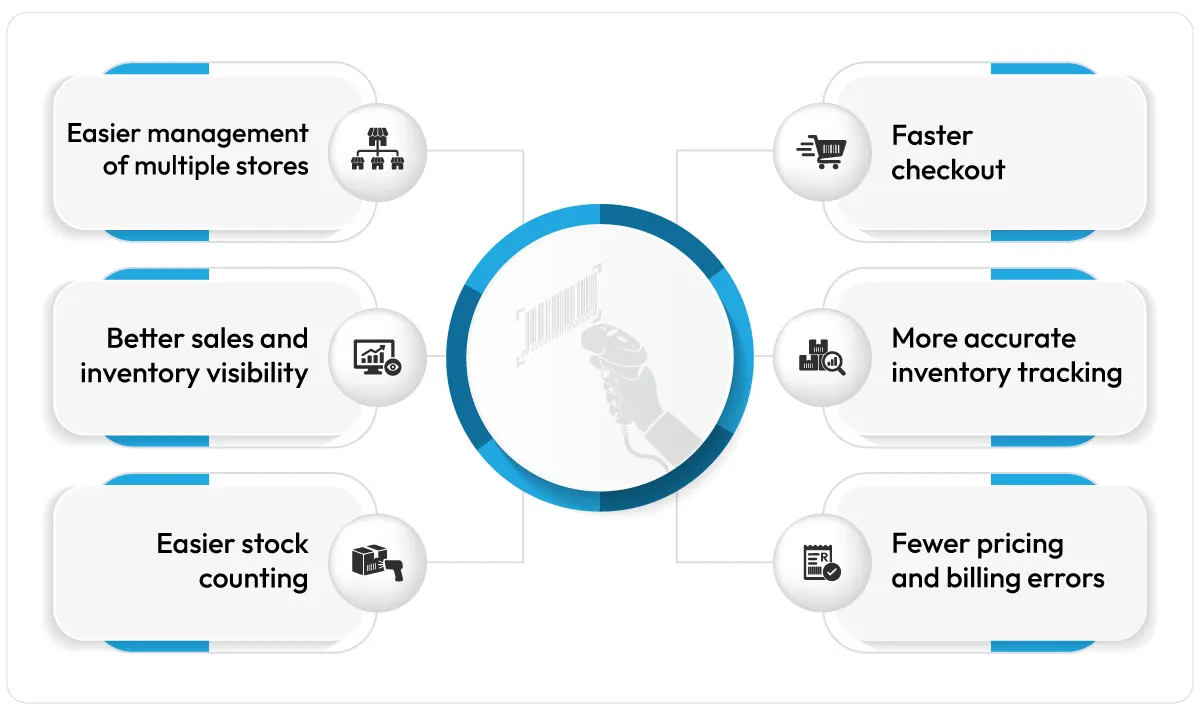
1. Faster checkout
Barcode systems provide fast checkout capabilities and improve customers’ shopping experience. All data on the product is scanned in an instant and added to the POS system with barcode scanning.
2. More accurate inventory tracking
Barcodes lead to accurate inventory tracking as barcode labels help categorise inventory as per the stock variant, product category, department, brand, etc. Barcode scanning at POS automatically updates the stock levels in the digital inventory register.
You always have the real-time stock number with a barcode system that is connected with both the POS and inventory module.
3. Fewer pricing and billing errors
When the cashier is scanning the item, rather than entering its cost manually, there is no possibility of a typing mistake at the checkout. Each product scan gets the data from the product record embedded in the barcode itself. So, barcodes reduce billing errors significantly.
This is especially important in South Africa, where billing errors can not only lead to your own losses, but one pricing mistake can also lead to losing the customer if they are charged extra.
4. Easier stock counting
A barcode-based system is the easiest system for cyclical stock counting or annual stock verifications. With a mobile app or barcode scanner, you can conduct physical stock audits easily by scanning the labels. Stock levels can be tracked easily based on barcodes rather than calculated through visual inspection of stock and recording of these numbers on paper.
Measuring stock movement that would have taken a whole day in a medium-size store can now be accomplished in a matter of hours with significantly fewer errors.
5. Better sales and inventory visibility
Every barcode scan made at checkout updates the sales and inventory reports in real-time. This means your inventory data is always current, and you know exactly what items are selling and what their current count is in the retail store or your warehouse.
In the absence of accurate and barcode-based information, retailers rely on memory or estimations, which take time and lead to losses due to both overstocking and understocking. Research shows that stockouts that happen repeatedly may drive off about 25% of customers in the long run.
6. Easier management of multiple stores
The standard barcode system deployed at all your retail stores ensures that products have the same billing method and stock update process regardless of their location.
Implementing such a centralised barcode system at all stores makes it easier to track inventory from all stores. You can request stock from other stores where any particular inventory is in excess.
What Lists, Tools or Devices Do You Need to Set Up a Barcode-Based Billing System?
Before you can create a single barcode, you will need to have five things in place:
- A product list: A detailed list of your products with their variant info, SKU-level details, and product data. This list can be uploaded to generate barcodes in bulk.
- GS1-compliant barcode numbers (GTINs): The specific code numbers your barcodes will represent (needed for barcoding if you deal with other major retailers).
- A barcode printer: To generate the labels you need for your products.
- A barcode scanner: You can use a scanner that is either handheld or mounted on the cash register.
- POS systems that support barcode scanning: Once you scan a product, the product info goes to the POS system.
Step-by-Step: How to Set Up a Barcode System in Your Retail Store
Read this guideline on how to implement barcodes in your own business, from listing your products to scanning your barcode in the cash register.
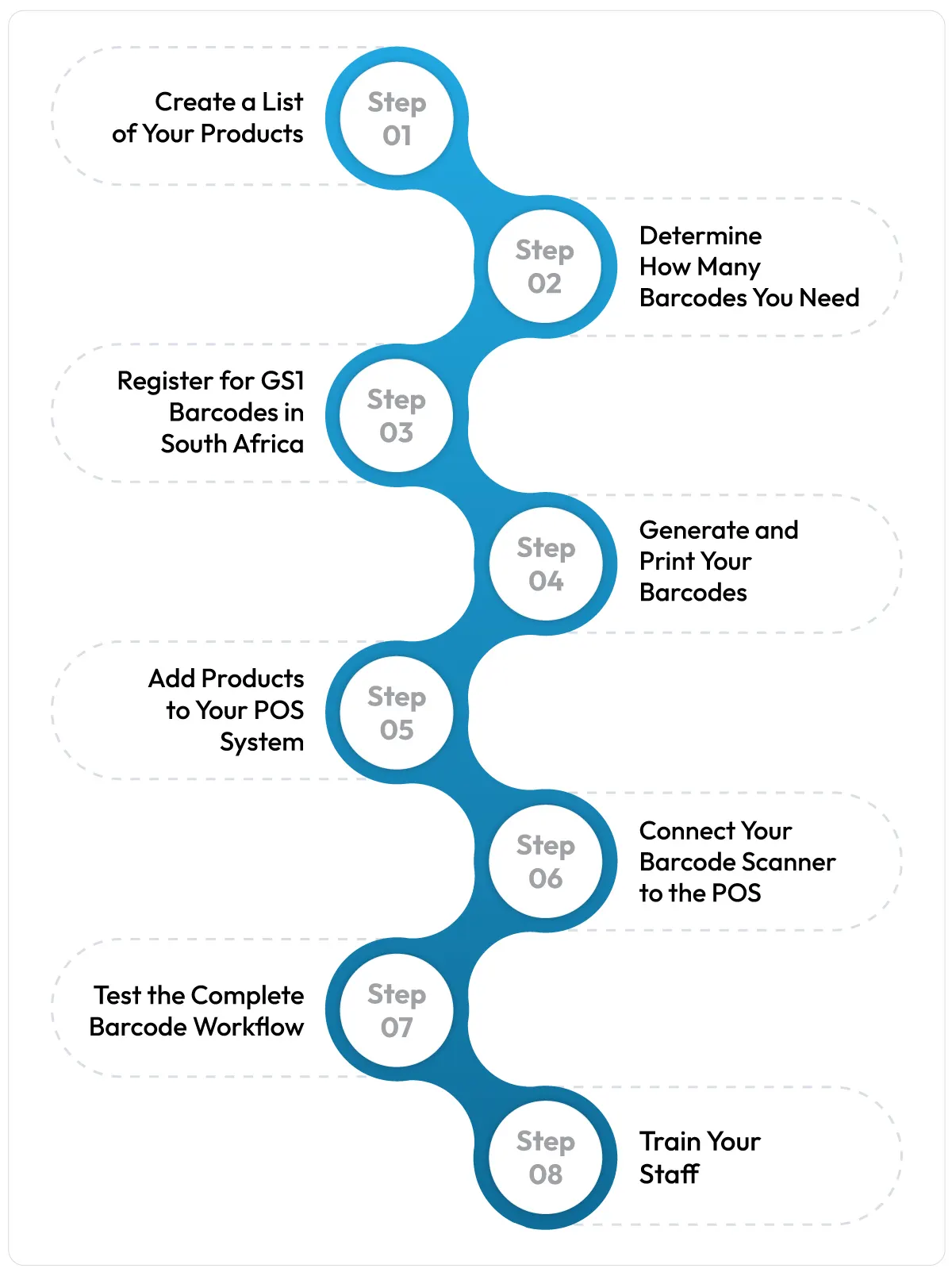
1. Create a List of Your Products
While thinking of barcodes, make sure that you prepare your list of all products before you start the barcode generation process. Know the differences in product category, product type, product colour, and product size.
Without this list, you will not be able to create a barcode system, so it is important to do it right.
2. Determine How Many Barcodes You Need
Different products need different barcodes, so it’s important to make sure you have the right number of barcodes you need. Take a count of the SKUs you currently have and add some margin for future SKUs.
Also, keep in mind that GS1 South Africa provides barcodes in bulk, so it makes sense to apply for some extra barcodes now, rather than re-applying in the future.
3. Register for GS1 Barcodes in South Africa
The only approved body to provide commercial barcodes is GS1 South Africa. If you intend to market your goods through a distribution system or any large retail outlet, you will be required to utilise barcodes issued by GS1. GS1 South Africa registers applicants who want a barcode prefix before they are able to create their own GTINs.
The service offered by GS1 South Africa is tiered based on the client’s turnover and quantity of barcodes needed. Thus, it is advisable to check the registration conditions with GS1 South Africa beforehand.
If you do not sell through distributors, you can forego the GS1 registration and simply generate barcodes internally using the barcode software you have.
4. Generate and Print Your Barcodes
As soon as you have the GTIN numbers, you can create the barcodes and print the barcode labels. Most barcode generator software can take a complete product list and generate all required barcode labels within minutes.
Many retailers do not understand how important the quality of printing is; if the barcode is distorted or unclear, it won’t be scanned at checkout. So, always use a quality barcode generator tool and use high-quality printing paper.
5. Add Products to Your POS System
Each barcode needs a corresponding record in the POS system. Enter the product name and category, variant, price, brand info, and stock data, and link the barcode number to the product record.
Also, check the pricing accuracy of the products while entering data, because there may be errors in the pricing entered here.
6. Connect Your Barcode Scanner to the POS
In this step, you need to connect your barcode scanner to the POS via Bluetooth or a plug. Most barcode scanners connect to POS systems easily. Check whether the specific barcode scanner you are using connects with the POS or not before buying it.
7. Test the Complete Barcode Workflow
Before the scanning process, try it out on a sample of products of various kinds and see that price, description, and availability are coming through accurately on your POS system. Include returns, discounts, and inventory adjustments during the testing phase to find flaws in the system.
8. Train Your Staff
The employees need to learn how to scan products, how to manage products, and how to print labels. The brief training saves much hassle later on, especially during the initial weeks of the system implementation.
What Type of Barcode Should a South African Retail Store Use?
Key Types of Barcodes Used in the South African Retail Industry:
EAN 13: For items sold at retail shops in South Africa, the EAN-13 barcode applies. This is the 13-digit linear barcode given by GS1 South Africa using the 600 and 601 codes, and it’s the type of barcode that every retail till system in South Africa can detect. There are two other barcodes that are important to be aware of, but you will mainly rely on EAN-13.
Code 128: This is a linear barcode that is often used for internal purposes, such as stock transfers, asset tags, and storage bins rather than for retail products that come into consumers’ hands.
GS1 QR Code (2D Barcode): Unlike EAN-13, a GS1 QR Code can hold batch numbers, expiry dates, and a link to a product page, all in one scan, through GS1 Digital Link.
How Barcodes Improve Retail Inventory Management
Based on actual statistics, poor stock visibility is already a problem for retailers globally. Retailers who set up a barcode system tied to their POS have higher levels of accuracy when it comes to stock management.
Barcodes transform every sale, return, and stock audit by creating a data point that is recorded automatically in the inventory system. Barcodes also allow for stock tracking at a lower level, including identifying parameters such as lot number, expiration date, as well as SKU.
Barcode System for Small vs Multi-Store Retailers
Small retail store
One shop with a single point of sale, such as a spaza shop, also requires a simple barcode setup: you create or get barcodes for products; you obtain a barcode scanner, which is then connected to one point of sale.
Multi-store retailer
Operating multiple branches requires central management of your barcode system and uniformity of codes. There is a need for one product master that can be accessed by every branch, insight into stock levels in different locations, and the opportunity to transfer stock between branches without generating duplicate records.
Intresting Fact Research conducted on retail technology adoption in South Africa indicates a difference in analytics capability between large retailers and their small-sized counterparts. Implementing a barcode system can reduce this gap.
Source:arxiv.org
How to Choose Barcode Software for Your Retail Store
Not every barcode tool fits every retail store. Before you commit, check the following:
- Offline capability: In South Africa, if you need to generate a barcode, it should not be prevented just due to internet connectivity issues. So, choose a barcode system that works offline too.
- POS and inventory integration: Does a scan at the POS update your billing and your stock inventory reports too? It is necessary if you want to keep everything automated.
- Multi-store support: A perfectly deployed barcode system at one branch must be able to replicate itself in another store too.
- Mobile scanning: Can you generate, scan, and print barcodes from a mobile device too? Sometimes, your hardware barcode scanners will fail, and therefore, a barcode system that works flawlessly on mobile too can be a lifesaver.
- Bulk barcode generation and printing: You cannot keep generating barcodes individually for thousands of product variants and SKUs. You need a system for bulk upload of a product list with details to generate hundreds of them in one go.
Barcode System Setup Checklist for South African Retailers
Use this checklist so that you don’t miss anything important for barcode setup.
- Build a complete product list, including all variants
- Count how many barcodes you need & plan some extra too
- Register for GS1 barcodes if you supply to other retailers
- Generate and print barcode labels at good print quality
- Buy and connect a compatible barcode scanner to your POS
- Test billing, returns, and stock adjustments before going live
- Train every staff member who will use the system
Wrapping Up
Vasy’s barcode software has all the features that a standard barcode system must have to work for South African retailers, wholesalers, and distributors. Moreover, it comes with offline barcode generation (generate barcodes even during internet outages) and the V-Label software, which makes it super easy to generate and scan barcodes with mobile devices.
FAQs About Retail Barcode Systems in South Africa
If you want to track a product in your inventory, using a barcode label is the best way to do it. Barcodes also make billing faster and more accurate by allowing staff to scan products instead of entering information manually. For loose items such as fruit and vegetables, barcodes may not be required as they can be billed using a weighing-scale-integrated POS.
Yes. Products that are sold separately should have separate barcodes. Variations such as different sizes, colours, flavours, or pack counts should have their own barcode so they can be identified and billed quickly and accurately.
Yes. Vasy's smart barcode generator lets you create barcodes for internal store management and billing. You do not need GS1 registration for internal use. However, businesses selling products to other retailers in wholesale should use official GS1-registered barcodes.
Most barcode scanners work with many POS systems, but compatibility should be checked before purchasing hardware. It is best to confirm scanner compatibility with your POS provider or use a mobile scanning app supported by your POS system.
Yes. When a product barcode is scanned, its details appear on the POS dashboard. Once the transaction is completed, the sale is automatically recorded and the corresponding inventory quantity is updated.
Last Updated on September 14, 2026