Quick Summary:
An offline POS for lost internet connectivity lets South African supermarkets continue billing, barcode scanning, updating inventory, and printing receipts even without internet. The transactions and all data get automatically updated in the cloud server when internet resumes. In South Africa, internet outages and load shedding are common disruptions to retail activities. This is why an offline POS system without internet becomes a necessity for retail businesses like supermarkets.
This article will help you understand:
- What is an offline POS and its key functions.
- Why internet connectivity is an issue for supermarkets.
- Difference between cloud-only vs. offline POS.
- How an offline POS like Vasy helps retailers?.
Internet outages are a common issue in South Africa that causes business disruptions in almost every sector. Frequent fiber breaks, DDoS attacks, and subsea cable damage are culprits behind most internet connectivity loss issues. Moreover, electricity constraints and load shedding further add to South Africa’s internet problems.
For supermarkets and grocery stores, the issue gets more complicated as most of the Till systems or POS systems for supermarkets are totally dependent on online connectivity. This is why you need a till system that can work without internet.
Yes, an offline POS that keeps running without internet connectivity and updates all offline captured data to the cloud once the internet resumes can solve the connectivity-led disruption issues.
This article details what an offline POS for lost internet connectivity actually does and why South African supermarkets need it.
What is an Offline POS System?
An offline POS system, also called a hybrid POS, is a point of sale billing system that works even without internet. It is designed to keep running all features, functions, and modules without internet too. So, even when internet connectivity is lost, it can still keep billing running, update the inventory data, and keep adding every transaction in offline mode.
When internet resumes, it gets online again and automatically adds the offline data to online mode. It means all your transactions, bills, and inventory updates done during offline mode are added now to the cloud. No data loss. No business disruption. No effect of the internet disruption on your billing, inventory, CRM, or accounting activities.
Without internet, it can scan barcodes, print a bill, apply discounts, and fetch inventory reports.
This advantage comes only with an offline POS or hybrid POS for South Africa.
Why Internet Connectivity Interruptions are a Problem for Supermarkets?
For those who have an online billing mechanism in their retail stores with a Till machine, internet loss means the current transaction needs to be carried out in cash only. Also, they will have to note the amount, product type, price, etc. in a manual register so that they can enter it again when the internet resumes. This is not business-friendly.
First, you need to enter the transaction in hand manually in a paper register or mobile phone notes. Then, when the internet resumes, you need to again enter the transaction in the till system manually. This gets complicated because you have to enter the product name, price, variant, date, and multiple other entries to keep your supermarket POS data updated. This is double entry and a loss of valuable time. It can still work if you sell only two or three items in a day.
For supermarkets or grocery stores, or liquor stores, it is not practical at all. With so many shoppers in the billing queue, your cashier cannot be expected to maintain a diary to write transaction data. At those volumes, mere transaction entries are not self-sufficient. You also need to update inventory data with every transaction to keep your stock list updated.
Power instability and load shedding also impact network performance, states the 11th annual State of Information, Communications and Technology (“ICT”) sector report, published on 31st March 2026. If you have load-shedding-led Wi-Fi loss, then you might still use a generator or electricity backup to keep your internet running.
As per the same report, the battery costs for ISPs rose from R173.8 million in 2024 to R387.7 million in 2025 due to load-shedding issues, an increase of about R214 million, more than double the prior year.
But what if the internet connectivity loss is from the provider itself? Internet disruptions from the ISP (internet service provider) cannot be solved by electricity backup. Telkom, Vodacom, MTN, Afrihost, Cool Ideas, and RSAWEB are some of the top ISP providers in South Africa.
However, the internet disruption issues are real. Here’s how major ISP providers in South Africa have acknowledged their internet outages on X.
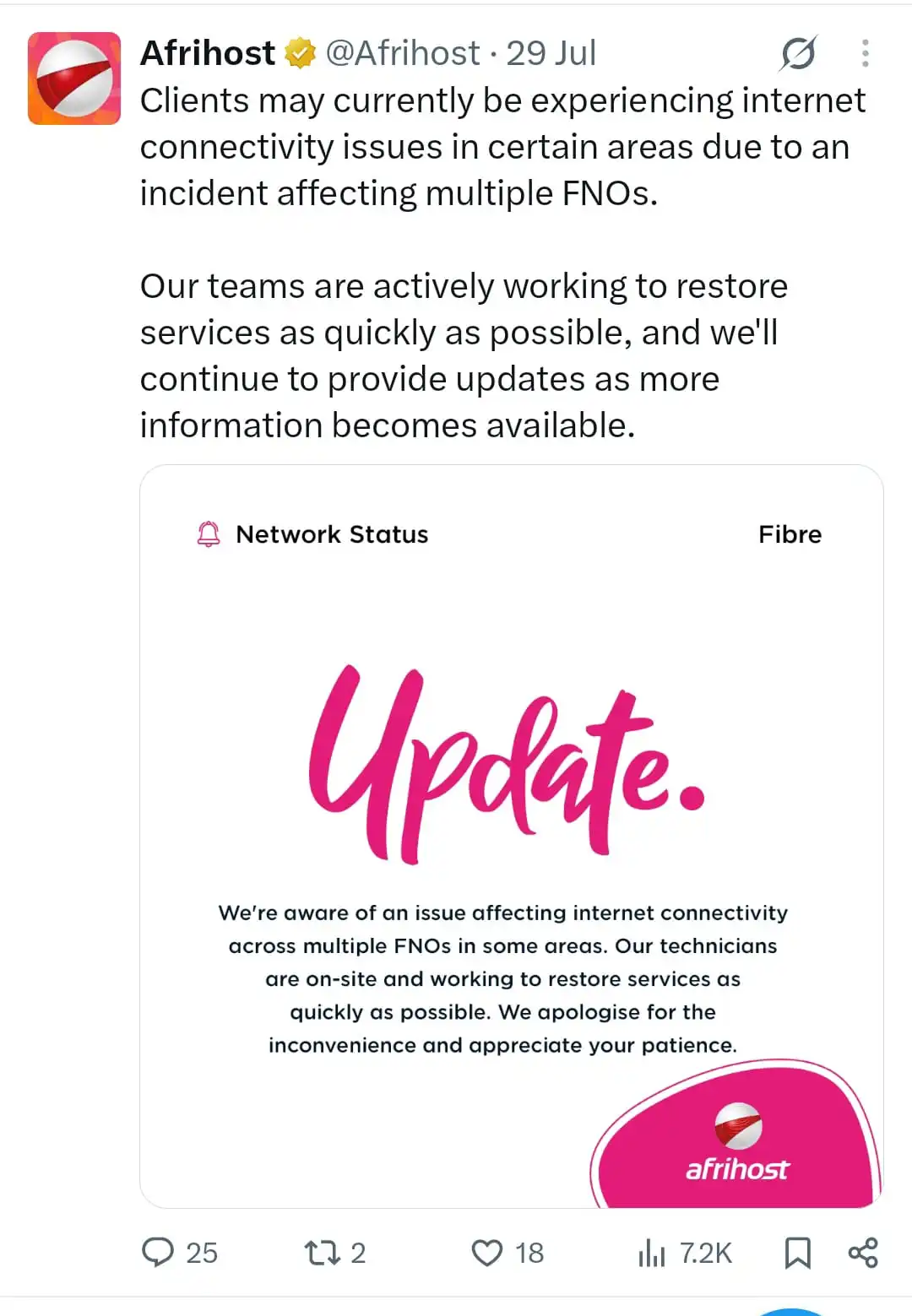
(Source: Afrihost Twitter)
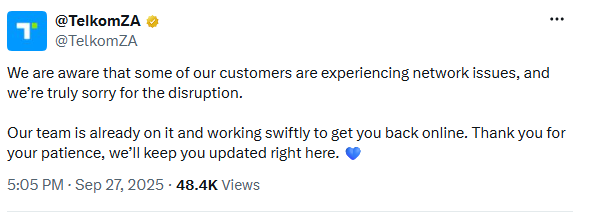
(Source: TelkomZA Twitter)
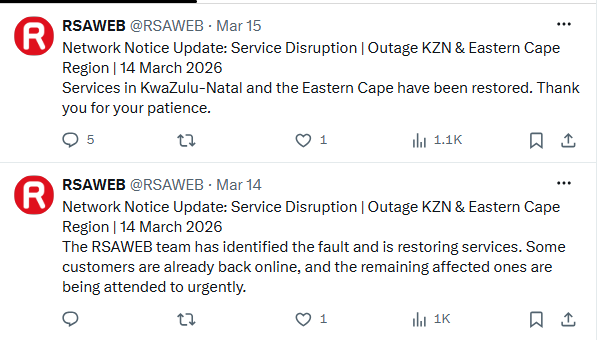
(Source: RSAWEB Twitter)
Cool Ideas internet users reported that their connections were completely down from around 07:00 on 5 May 2026. (Source: MyBroadBand)
While load shedding is an issue in South Africa, supermarkets or retail stores can still solve it using electricity backups such as generators, UPS on desktops, or the battery backup of a laptop. However, the internet is something that comes from the internet service providers only. There is no other way.
What Should a POS System Do When Internet Connection is Lost?
POS systems are the main technological support in retail stores and supermarkets. They are like personal business assistants. From billing to inventory management, their role in running a retail business is immense. However, they are of no use if they stop due to internet connectivity loss. Such disruptions are common in South Africa, and without an offline running feature, the POS is extremely outdated.
Modern POS systems have offline availability. They keep running all activities in a supermarket or grocery store in offline mode too. No one even notices that the internet is down.
Let’s discuss what a POS system should do during internet outages:
1. Continue Processing Sales
Cashiers should be able to bill as usual, add items, and all the product data should be visible on the POS dashboard. Cashiers should also be able to apply discounts, loyalty points, vouchers, etc. In short, internet disruption must not freeze the screen and the billing activity. The billing queue should keep moving as fast as it does during internet connectivity.
2. Store Transactions Locally
All billing transactions, inventory updates, and customer contacts taken during the offline period should be stored locally in the POS and its connected server. These transactions are then automatically updated in the cloud when internet resumes.
3. Continue Barcode Scanning
Barcode scanning should keep going as it is. You take the barcode device with an embedded battery in it. It scans the products as usual. The prices, discounts, and product data from the label should get visible on the terminal/billing dashboard.
4. Print Receipts
Customers still expect a receipt. You cannot refuse a bill by giving the internet excuse. A proper offline POS prints a bill from data already stored on the local terminal in offline mode. Yes, for printing capabilities, you will only need electricity connectivity.
5. Update Local Inventory
Stock counts change with every sale on the POS. So, when your cashier scans and adds an item into the POS and the bill is generated, it means the item should no longer appear in the existing stock list. It must be marked as sold, and stock numbers must be adjusted accordingly.
An offline POS must be able to update the inventory without internet.
6. Maintain Cashier Access
While cloud POS is designed for security and authentication, in offline mode, this feature must not be compromised. So, login credentials, role-based access, permission levels to cashiers, etc. work as it is during the internet outage too.
7. Synchronise Data When Connectivity Returns
Once the connection is back, every stored transaction should get updated automatically to the central system, without the requirement of a manual export or manual data entry. This is what a real hybrid POS does essentially.
What Happens When Internet Connectivity Returns?
Going back online is where a weak offline mode usually fails. It might not be able to update all data back to the server. Any data loss can create issues such as inventory and billing mismatch. A well-built POS system without wifi handles the internet return automatically. You or your team have to do nothing. No trouble at all.
1.Automatic Data Synchronisation
All transactions stored locally are sent and updated on the central server the moment a connection is detected, without staff needing to trigger anything manually. No manual entry or upload required.
2. Reconciling Offline Transactions
The system checks every offline sale against the central database, matching stock movements, payment records, and customer or loyalty data. It reconciles the data online so all data stays in order, and no disparity is created.
3. Updating Central Inventory
Stock levels recorded offline merge into the main inventory count, so everyone who opens the POS dashboard (staff, inventory managers, warehouse managers, supply managers, and the owners) sees the actual current stock data only. The stock number mentioned on the dashboard will be the updated one only.
4. Avoiding Duplicate Transactions
A well-built sync process checks for duplicate entries before posting anything, so the same sale doesn’t get recorded twice if a terminal reconnects more than once during the process.
5. Reviewing Offline Sales
Managers should be able to pull a clean report of exactly what sold offline, when, on which terminal, and by which cashier, for reconciliation, audits, and end-of-day cash-ups.
Offline POS vs Cloud-Only POS for South African Supermarkets
Manual POS and only Cloud POS both struggle when internet disruptions strike. Only a hybrid POS is the right answer. This is why offline POS availability is one of the top features required in modern supermarket POS systems.
| What Happens | Cloud-Only POS | Offline (Hybrid) POS |
|---|---|---|
|
Billing during an outage |
Stops completely |
Continues as normal |
|
Barcode scanning |
Fails |
Works from local data |
|
Receipt printing |
Often blocked |
Prints from local data |
|
Stock updates |
Frozen until reconnected |
Updates locally, syncs later |
|
Data risk |
Sales can be lost if not handwritten |
Sales stored offline, synced automatically |
|
Best suited for |
Areas with stable, uninterrupted internet |
South African supermarkets facing outages or network faults |
What Hardware Do You Need for an Offline POS Setup?
Offline POS setup requires the perfect combo of well-coded software and compatible hardware devices that support the hybrid mode.
Below are all the hardware requirements to run the POS in the offline mode:
1. POS Terminal
A POS terminal capable of running billing software locally. It should support online/offline mode and store data locally and in the cloud as required.
2. Barcode Scanner
A scanner that reads from the product labels and is capable of sharing the data to the POS terminal in both offline and online mode.
3. Receipt Printer
A printer that works directly from the local device. A plugged-in printer with a cable so the bill gets printed even when the internet connection is completely down.
4. UPS or Backup Power
A basic UPS keeps the main POS terminal, barcode scanner, and printer running through short power interruptions. Handheld barcode scanners with battery-led operations can be an added benefit.
5. Backup Internet Connection (Mobile POS)
A secondary connection, such as mobile data connectivity, can help during electricity cuts. POS systems with mPOS functions can keep billing running in online mode when electricity fails or wifi stops, but the internet is running on the mobile.
How Vasy POS Helps South African Retailers Keep Selling Offline?
Vasy’s hybrid POS is a till system without internet that runs seamlessly during power outages in South Africa. We built Vasy’s offline POS after extensive research of South Africa’s load shedding and internet disruption aspects. We created a POS system without internet; while it runs on the cloud and with internet connectivity, it can work without it too.
Vasy’s offline POS system runs billing, barcode scanning, receipt printing, cashier access, and stock updates locally, then syncs everything automatically the moment the connection returns, with no manual intervention needed.
It’s built for South African retail, and offline POS isn’t its only strength. It also has features for VAT-ready billing, an inventory module, SARS-compliant financial records, and support for cash, card, and EFT payments at the till.
Weight-scale integration, multi-UOM management, and expiry tracking all continue to work from the terminal’s local data too.
Book a free demo of Vasy’s hybrid POS software and see how it keeps your supermarket billing, online or offline.
Frequently Asked Questions About Offline POS
Yes, if it has an offline or hybrid mode feature. An offline POS can continue processing supported transactions without an internet connection and sync the data once connectivity is restored.
Yes. An offline POS can continue working during load shedding when supported by mobile POS functionality or suitable backup power such as a UPS. This allows businesses to continue billing and recording transactions during power or connectivity interruptions.
Yes, depending on the card payment terminal and its connectivity options. Many card machines have a SIM-based backup connection, allowing card transactions to continue even when the store's Wi-Fi or fibre connection is unavailable.
Yes. A hybrid POS can record sales, refunds, and returns while offline and update inventory records locally. Once connectivity is restored, the transactions are synchronised with the cloud so inventory levels remain up to date.
Last Updated on September 14, 2026