Quick Summary:
South African retailers managing more than one location for their inventory often face stock visibility issues. Without an inventory management system, it is difficult to keep an exact record of inventory from multiple store locations or warehouses. This is why retailers need multi-location inventory management solutions, best practices, and techniques.
This article will help you understand:
- What is multi-location inventory management?
- Why retailers need it?
- Challenges of managing multi-location inventory
- How Vasy helps in multi-location inventory management.
Multi-chain retailers with their inventory stocked at different locations, including stores and warehouses, often find it difficult to control and manage their stocks. Stock transfers between store locations make it more challenging. Further, there are issues like overstocking of inventory at one store location and stockouts at another. The problem is that most stock registers maintained at different locations are not connected.
Retailers who have not implemented an inventory management system to see stock across various locations on a centralised system face this issue.
Every location has its own products, types, categories, shelves, and stock numbers. Unless all of them are connected, nobody knows the exact stock status at various locations. This is why multi-location inventory management is required to record, control, and manage stocks at various locations centrally.
What is Multi-Location Inventory Management?
Multi-location inventory management is the set of practices, systems, and processes to efficiently manage stock across locations and branches. It helps mitigate the challenges associated with managing multiple SKUs, product variants, and assortments across locations.
Multi-location inventory management records every ‘sale of stock at the POS system,’ ‘transfer of stock from one location to another’, and ‘return, damage, or expiry’ of any stock at all locations. The idea is to record every transaction that changes stock levels.
Multi-location inventory requires the following activities to be done with the inventory:
- Recording
- Tracking
- Controlling
- Viewing
- Transfering
- Replenishing
- Consolidating
Locations Across: Stores, Warehouses, and Branches
Method: Both standalone records at individual locations and consolidated records of all locations managed centrally.
Did you Know Inventory distortion, the combined cost of out-of-stocks and overstocks, costs retailers an estimated US$1.7 trillion a year. That equals 6.2% of global retail sales.
Source:IHL Global
How Multi-Location Inventory Management Works
Multi-location inventory management works by keeping all records of stock at various locations centrally under one product master. While individual store locations also need to manage the stock records of their particular location, a central inventory management system is the core multi-location stock management principle.
The centralisation of records is extremely important. For instance, if I am a supermarket chain owner and one item is sold at one location, then my inventory system must record it both in a standalone and consolidated way.
| Store Location One | Store Location Two | Store Location Three | Warehouse | Central Records |
|---|---|---|---|---|
|
Oil Tin 5 Litre Brand: XYZ Stock Count: (11) |
Oil Tin 5 Litre Brand: XYZ Stock Count: (6) |
Oil Tin 5 Litre Brand: XYZ Stock Count: (2) |
Oil Tin 5 Litre Brand: XYZ Stock Count: (10) |
Oil Tin 5 Litre Brand: XYZ Stock Count: (29) |
Event: One 5-litre tin of XYZ brand is sold at Store Location Three; then the real-time inventory record update must be as follows:
| Store Location One | Store Location Two | Store Location Three | Warehouse |
Central Records |
|---|---|---|---|---|
|
Oil Tin 5 Litre Brand: XYZ Stock Count: (11) |
Oil Tin 5 Litre Brand: XYZ Stock Count: (6) |
Oil Tin 5 Litre Brand: XYZ Stock Count: (1) |
Oil Tin 5 Litre Brand: XYZ Stock Count: (10) |
Oil Tin 5 Litre Brand: XYZ Stock Count: (28) |
This way, the inventory manager who is overseeing all three locations knows that soon store location three will be out of stock of the Oil Tin 5 Litre product. The manager can transfer Oil Tin from store location one or two, or the warehouse, to store location three. Only when the central stock number goes below a threshold (for instance, below 20) will the inventory manager reorder the product from the pre-mapped supplier.
How does it work?
1. One product master.
2. Location-wise stock.
3. Automatic stock updates.
4. Controlled stock transfers.
5. Central reports.
Cloud-based multi-location inventory management makes all this possible.
Multi-Location vs. Multi-Branch Inventory Management
Many retailers use these two terms interchangeably. Though related, they are not identical.
- Multi-branch generally refers to inventory kept at various branches of your retail business.
- Multi-location is broader. It covers branches, stores, various storerooms at the same branch, warehouses, distribution centres, and your online fulfilment centres too.
Pro Tip: Implement inventory software that handles both multi-location and multi-branch inventory.
Why Real-Time Multi-Location Stock Visibility Matters for Retailers
Real-time multi-location stock visibility matters a lot. Smarter replenishments, transfers, and stock decisions are taken based on real-time visibility.
So, why does it matter so much?
- Fewer lost sales: Your customers won’t find shelves empty.
- Smarter transfers: You move surplus stock from one branch to another instantly before stockouts.
- Less wastage: Surplus stock that may expire, waste, or stay unsold at one location can be smartly sent to another with low stock to prevent stock losses.
- Better buying decisions: You reorder only when the central inventory count goes below the threshold.
Who Needs Multi-Location Inventory Management?
Shoppers don’t wait for you to replenish stock on an empty shelf. They will move to a competitor to buy the same. Therefore, every retailer who wants to keep their stock in adequate numbers across locations needs multi-location inventory management.
1. Retailers With Multiple Stores
Retailers that have chain stores or franchises and have to manage inventory from their various locations need multi-location inventory management. For instance, garment stores, footwear retailers, pet stores, etc., often have stock inventory at various locations (stores and warehouses). For instance, one footwear branch may sell out of a popular footwear brand, size, or colour while another holds extra stock of the same item.
2. Supermarkets and Grocery Chains
Supermarkets and grocery chains stock their shelves with several hundred SKUs. With centralised multi-location inventory management for supermarkets, a product nearing its expiry date in one store can be transferred to another where the demand is high. Therefore, central stock visibility is a must-have feature of supermarket POS systems.
3. Wholesalers and Distributors
Wholesalers and distributors have stock at various warehouses, distribution centres, and fulfilment centres. They need multi-location inventory management to swiftly fulfil their retailer network’s stock demand. With central visibility of their stock, they can easily fulfil orders by sending the stock available at the nearest location.
4. Businesses With Multiple Warehouses and Branches
Some businesses keep stock in several warehouses along with their retail branches. Others also fulfil online orders directly from their stores. When a customer orders online, your system must know which location has the stock. Also, it is easier to transfer stock between warehouses and stores with central stock data.
Challenges of Managing Inventory Across Multiple Locations
Here are the top challenges South African retailers face when managing inventory across multiple locations:
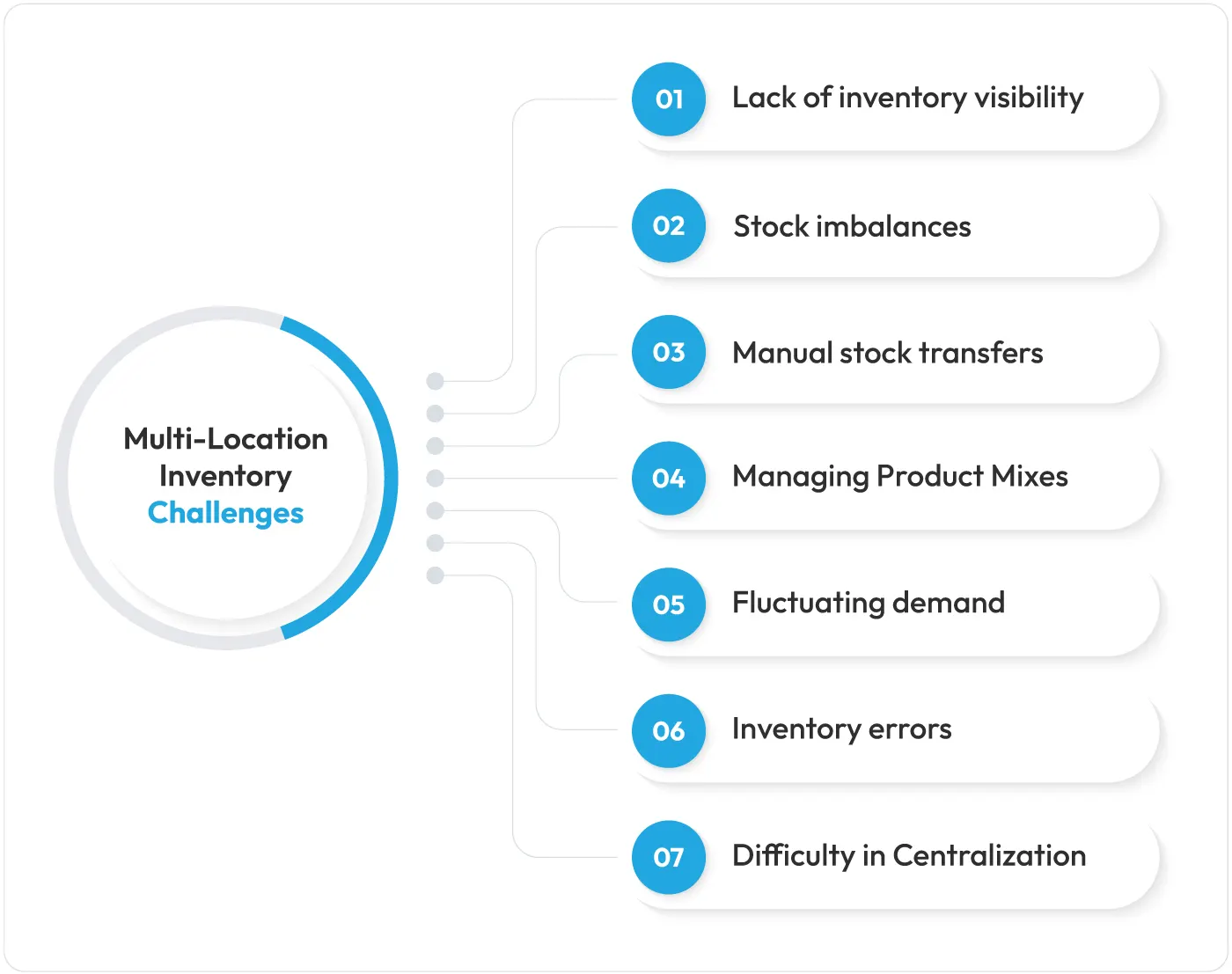
1. Lack of real-time inventory visibility across branches: When there is no central system to see all stock across branches at various locations.
2. Stock imbalances between stores and warehouses: Retailers often face scenarios where one of their stores is overstocked, one is understocked, and one is running out of stock. Similarly, some of the inventory gets expired/damaged in their warehouse because it was not tracked.
3. Manual stock transfers and inventory updates: Messaging other stores on WhatsApp or email to ask if they have any spare stock is an outdated process.
4. Different product mixes across retail locations: Branches rarely stock the same product assortments. Also, products have different variants, units of measure, brands, colour, types, etc. Different product mixes complicate inventory management across locations.
5. Fluctuating demand between branches: Product demand is not consistent across locations and branches. It differs by area, consumer profiles, seasonal demand, any ongoing event in that particular region, etc.
6. Inventory errors and stock discrepancies: Without an audit trail and stock verification system, one wrongly entered stock quantity can create discrepancies in stock registers.
7. Difficulty managing centralised and branch-level operations: It is always challenging to record both central and standalone stock counts when you have multiple locations.
Multi-Location Inventory Management Best Practices for South African Retailers
The right processes and habits make multi-location inventory management work.
Here are the best practices for South African retailers.
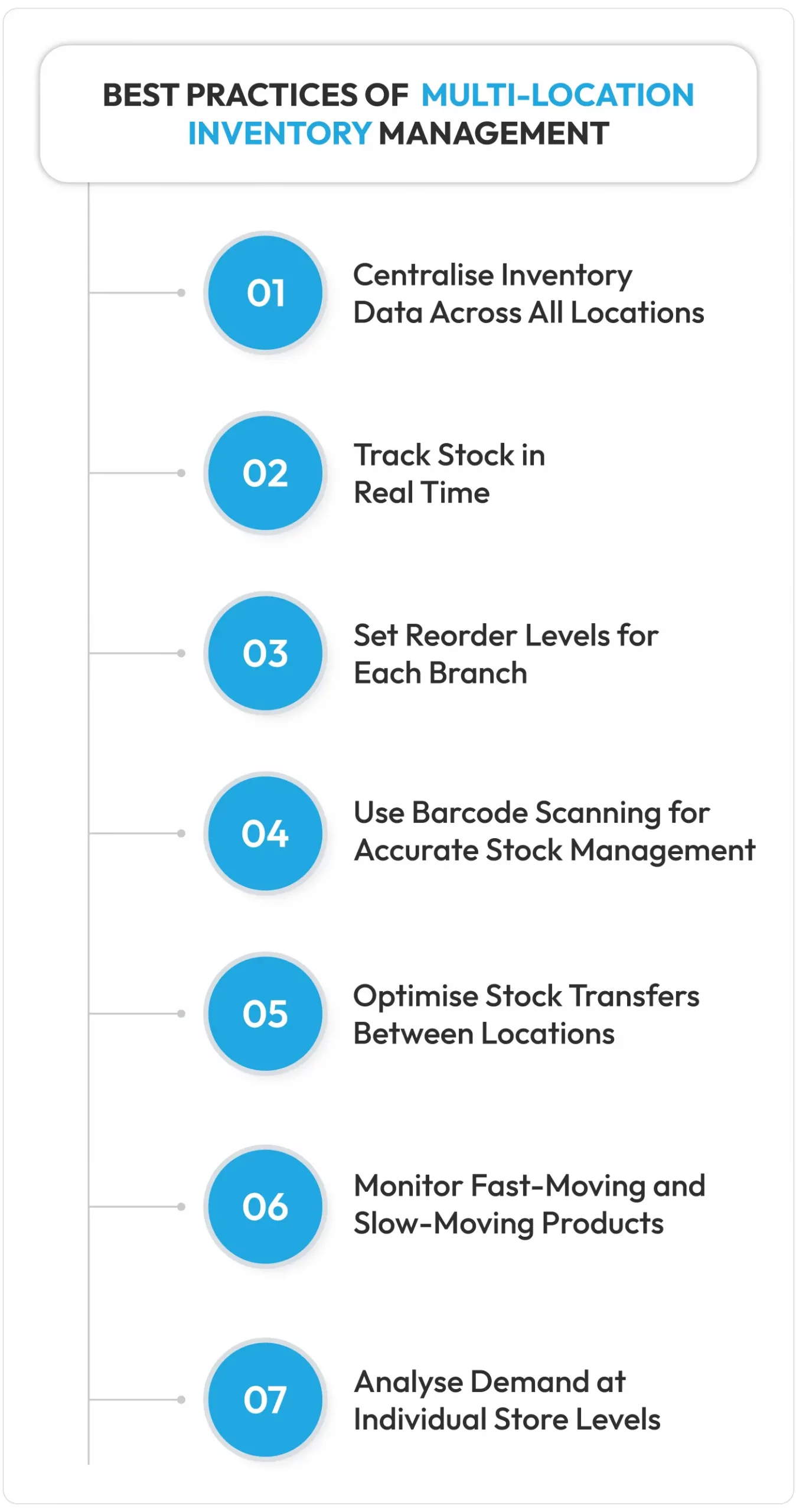
1. Centralise Inventory Data Across All Locations
Retailers need to centralise their inventory records when they have multiple stores. Central stock databases are the first way to improve stock visibility. You can see all your stock and their numbers on a single dashboard if you centralise them digitally.
All branches and their authorised inventory managers can see stock data without emailing or sending WhatsApp messages for stock data.
With smart inventory management systems, managers can see real-time data from various sister stores and order from the store where surplus inventory is available.
2. Track Stock in Real Time
One of the best practices of multi-branch inventory management is tracking every sale, purchase, and transfer of stock. Retailers must even track expired products, damaged ones, and returned ones to keep inventory records accurate.
For this, you need connected business management software that integrates POS, inventory, CRM, ERP, and warehouse data from all store locations. One sale at any branch and the inventory gets updated centrally. All inventory managers see the current stock numbers only.
3. Set Reorder Levels for Each Branch
You cannot set the same reorder levels or thresholds for all your stores. Each of your store locations will have different stock selling data. Therefore, use inventory software to analyse the product-wise sales and decide what number best suits automated replenishment.
4. Use Barcode Scanning for Accurate Stock Management
Manual inventory counts are the biggest culprits of stock counting errors. Barcode scanning removes errors by expediting the counting process while retaining counting accuracy. Use a barcode scanner to speed up the inventory counting process.
5. Optimise Stock Transfers Between Locations
Never transfer stock based on WhatsApp messages. Even if you do that, enter the same in the inventory system as a priority. Secondly, transfer based on current stock numbers.
Example: If Store A has 50 units of a product and Store B has 70 units of the same product, and Store C is facing a low stock scenario, then it's prudent to transfer inventory from Store B to Store C. This optimisation will materialise only if you can centrally see all inventory numbers from all three stores.
Note: Always check for surplus stock in other branches before you reorder from suppliers. A stock transfer is often cheaper and faster than a new purchase.
6. Monitor Fast-Moving and Slow-Moving Products
Use a system that tells you which of your stocks sell more and less. Fast-moving products need to be replenished more quickly. You can use the inventory turnover ratio analysis feature of an inventory system to find which stocks move fast/slow.
7. Analyse Demand at Individual Store Levels
All stores have different demand (product-wise, category-wise, brand-wise, and even SKU-wise). Therefore, smarter multi-location inventory management means you need to analyse demand from various stores before you make reordering decisions. Branch-wise POS reports make this analysis quick and easy.
How South African Retailers Can Manage Multi-Location Stock During Supply and Operational Disruptions with Vasy?
Disruptions are part of doing retail business in South Africa. The main disruptions stem from power cuts, connectivity issues, port delays, government restrictions, protests, and even global supply chain issues.
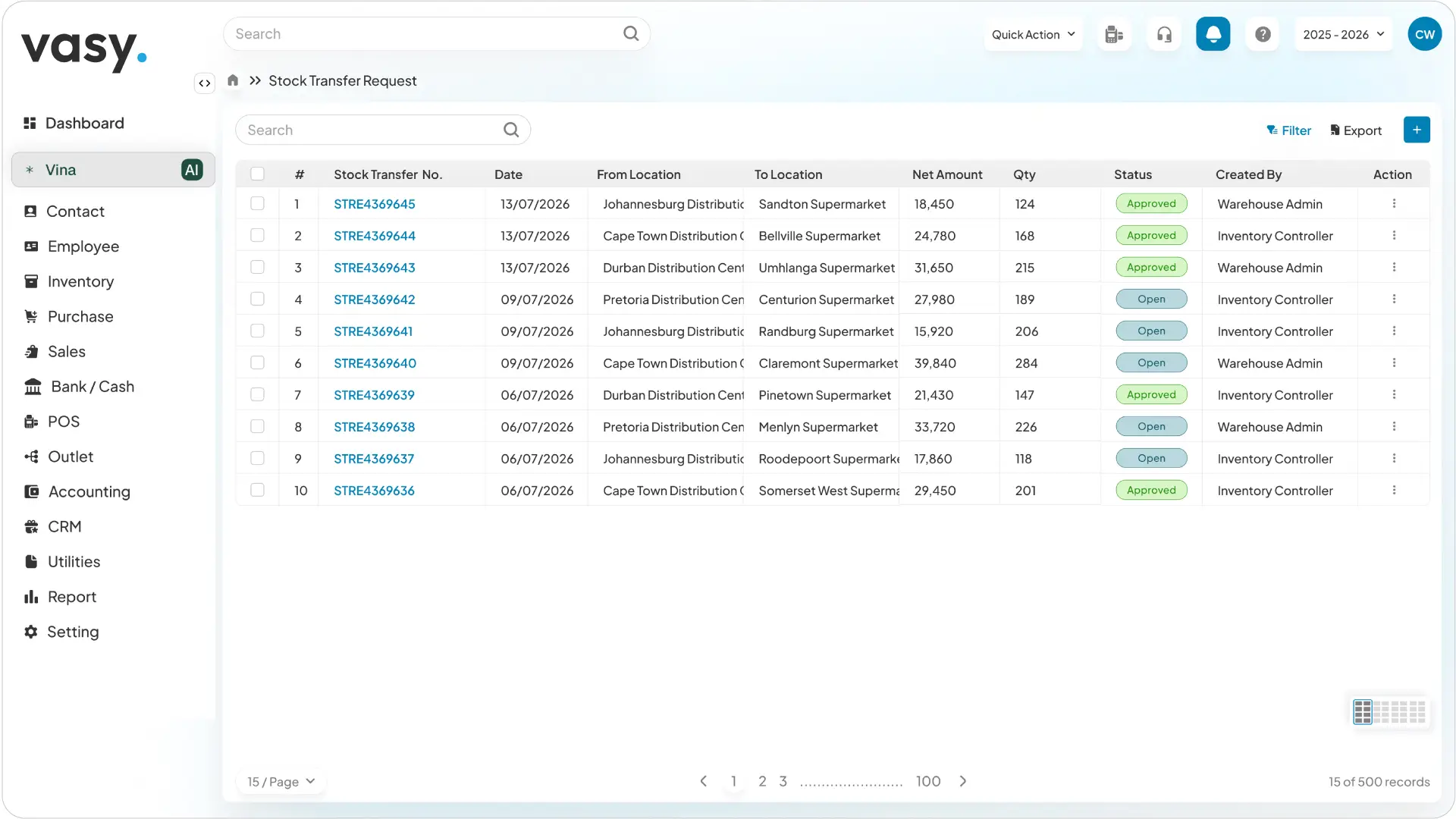
Multi-location inventory management gives you the visibility to respond quickly when these disruptions hit.
1. Maintain Visibility Across Stores and Warehouses
Issues related to supply chain delays can be solved by being proactive and implementing smarter ways to fulfil your inventory requirements. For instance, if you know that you are not going to receive stock from a key supplier for the next 15 days as their inventory is stuck at a port due to some customs issues, then you can use your buffer stock in the meantime or prudently transfer stock using Vasy between branches if you have visibility across warehouses and stores.
2. Plan Stock Replenishment Based on Local Demand
During supply chain disruptions, it is better to check your inventory system for location-wise product demand. You can allocate stock for each location accordingly. Check branch-wise sales reports in Vasy to understand which stock is selling more or less at which branches.
One branch manager can raise a stock transfer request to another from within the inventory system itself. Vasy also records all such internal inventory multi-location transfers and requests for the audit trail and stock verification.
3. Keep Critical Inventory Data Accessible During Connectivity Issues
Power and internet failures hit your tills first. Targeted load reduction continues in some South African regions and areas. So your stock system must cope with load shedding issues.
It must not stop updating stock when power fails and cause internet disruptions. This is why you need to choose inventory software with hybrid capabilities (works both online and offline) like Vasy.
4. Automatically Update Inventory After Sales, Purchases and Returns
Each POS sale automatically updates the inventory registers. Any returns, refunds, exchanges, and damages of stock are also updated to the inventory records. Even unit conversions apply on their own. If you are buying in cartons and selling in pieces, the multi-UOM feature of Vasy’s with a supermarket POS system is highly relevant here.
5. Manage Barcodes Across Multiple Locations
Vasy’s core utilities include barcode generation. You can generate and print barcode labels using Vasy’s barcode generator tool. These barcodes can be scanned with Vasy’s mobile app for stock verification drives.
6. Set Reorder Levels and Low-Stock Alerts
Set thresholds for each product. Vasy sends low-stock and negative-stock alerts automatically and also flags your least-selling items. Vasy’s expiry alerts before stock expiry help reduce wastage for grocery stores. Automated procurement levels with their threshold stock limits can be set for automated replenishments.
7. Monitor Branch-Wise Inventory and Sales Reports
Vasy offers 150+ reports related to sales, inventory, financials, customers, suppliers, etc. You can see branch-wise stock reports, performance reports, etc., to improve your multi-location inventory management operations.
Here is a quick look at what Vasy offers for multi-location businesses:
| Stock Control | Transfers | Alerts | Reports |
|---|---|---|---|
|
|
|
|
Bottom Line: Build Better Control Over Inventory Across Every Location
Every South African retailer who runs more than one location understands the complexity of managing inventory across locations. While the whole retail business depends on products that should be well-stocked on shelves, it is challenging for the retailer on the ground to ensure this. Manual methods do not work in modern retail stores where you manage hundreds of SKUs.
Multi-location inventory management software and best practices are the only solution for hassle-free and profitable inventory management.
You move stock faster. You buy smarter. You lose fewer sales.
Book a free demo of Vasy, a trusted inventory management software with features for multi-location and multi-branch management.
Last Updated on October 13, 2026